30 Days: Outbreak Mobile Controls Guide
Joystick, shooting, looting, crowbar, repair kits, and raid UI on Android and iOS.
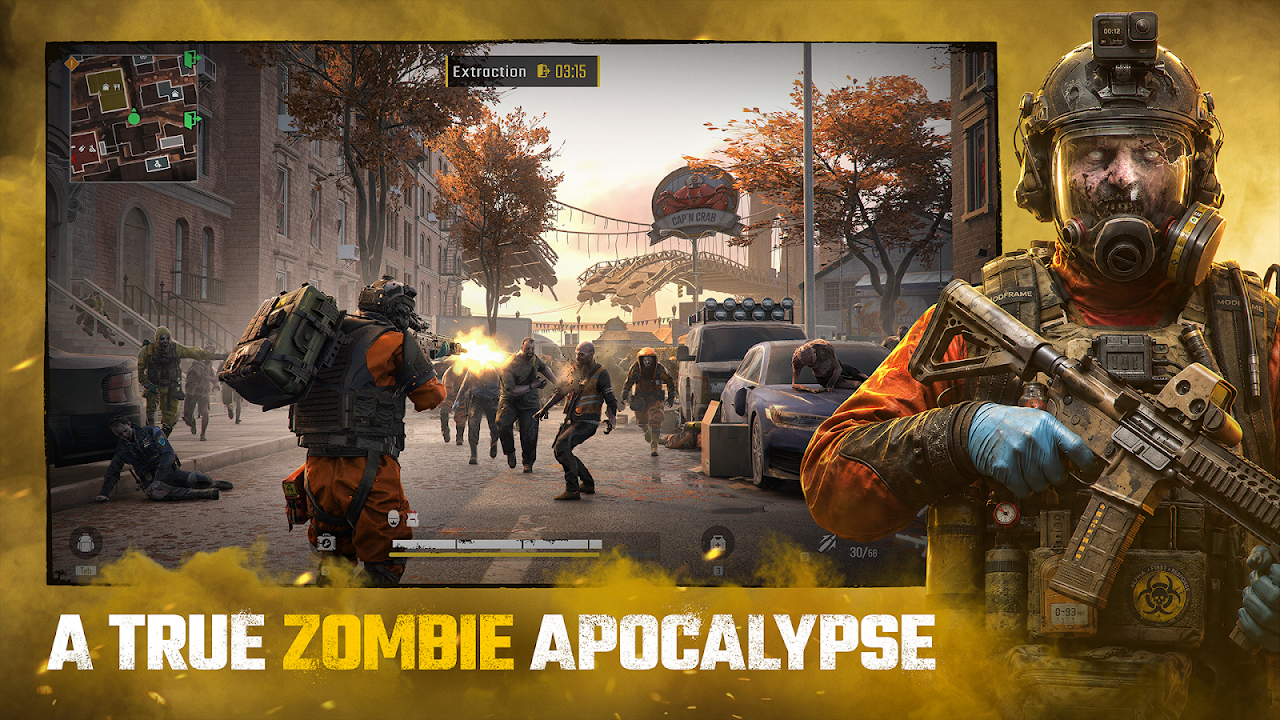
30 Days: Outbreak is built for touch-first play on Android and iOS. Soft-launch Alpha will keep polishing HUD scale and button placement, but the core verbs stay stable: move, aim, fire, loot, crowbar locked doors, repair, deploy into a raid, and unload your backpack after extract. Master these inputs before you blame the Loadout Guide for a death that was really a missed reload.
Pair this page with Getting Started for first-hour habits and How to Extract for timer discipline once you can actually press the right icons under stress.
Movement: virtual joystick
The left-side joystick handles walking and sprinting (exact sprint gesture may vary by Alpha build—╁—╅—d forward threshold, dedicated sprint button, or stamina toggle). Tips:
- Keep the thumb loose; death-gripping the stick makes micro-adjustments impossible in third-person peeks.
- Strafe while looting so you are never a static target in a doorway.
- Practice 180 turns in a quiet corner of a district before contested raids.
- Watch stamina—╁—╅—austed players lose extract races when infected cut the lane.
If sensitivity feels wrong, adjust look sensitivity in settings before your first contested kit raid. High look speed helps against flanking scavengers; too high and AR sprays walk off target.
Aiming and firing
Fire is typically tied to the crosshair / right-side fire control. Third-person shooters on phones reward short bursts and pre-aiming corners:
- ADS when the engagement distance demands it; hip fire only when a shotgun room clear is intentional.
- Reload behind cover, not mid-street after a spray.
- Learn the fire button—╁—?dead zone so looting taps do not accidentally discharge and announce your position.
- In co-op, call reloads so a partner covers the stairwell.
Sidearms exist for empty-mag panic—╁—╃—€—tice the swap until it is muscle memory. See weapon roles in the Loadout Guide.
Looting crates and world items
Loot prompts appear on crates, bodies, and interactable props. Best practices:
- Face an exit before you open anything valuable.
- Tap loot quickly, then move—╁—nding in the glow is how third parties find you.
- Prioritize value density; leave junk if your bag needs the empty third for extract finds.
- Do not loot while a teammate is already fighting in the same room unless you are the designated medic.
Audio cues matter as much as the button. Opening containers is noisy; treat every crate like a beacon.
Crowbar on locked doors
Soft-launch gameplay highlights crowbar interactions on secured doors. The crowbar is a progression and risk tool:
- Approach the locked door, trigger the crowbar prompt, and commit only when the hallway sounds clear.
- Expect noise—╁—╃—e after the door opens before rushing crates.
- In co-op, one player crowbars while the other watches the approach.
- Skip crowbars when your bag is already rich and extract is close; greed doors near popular loot rooms feed PvP.
Crowbar discipline is a major part of successful extracts—╁—╂い—ail lives in How to Extract.
Repair kit icon
Repair kits keep weapons or gear usable when durability drops mid-raid (exact systems can shift in Alpha). Find the repair kit icon on the HUD or radial, then:
- Repair behind cover, never in the open while infected aggro.
- Carry at least a learning-kit level of repair capacity before deep district pushes.
- If a primary breaks and you lack repair, swap to sidearm and rotate to extract instead of forcing a street duel.
Add repair habits to your post-raid checklist in the stash so the next deploy starts green.
Raid button and deploying
The raid button (labeling may read Raid, Deploy, or similar) sends your selected kit into a district. Before you tap it:
- Confirm learning versus contested kit intent with teammates.
- Check heals, stamina, grenades, and empty bag third.
- Glance at Districts notes if you are picking a zone for quieter practice.
- Accept that soft launch may wipe progress—╁— How to Download for Alpha expectations.
Never mash raid with a broken primary and zero meds —╁—€— to queue faster.—╁—い—## Backpack unload after extract
After a successful leave, use backpack unload / stash transfer flows to bank loot. Habits:
- Unload high-value items first.
- Repair and refill consumables before the next raid button press.
- Keep a reserved learning kit untouched so a contested death does not erase your practice loadout.
- Review what you died with last time; if the bag was already —╁—d enough,—?you should have extracted earlier.
Accessibility and comfort tweaks
During soft launch, explore settings for:
- HUD scale and button opacity.
- Left-handed layouts if offered.
- Graphics presets that stabilize frame time—╁—╅—㈠—put lag loses gunfights faster than medium textures.
- Audio mix so footsteps and crowbar noise remain audible over music.
PC emulators are optional and unofficial; even there, understand the touch verbs first so key maps match real actions. Download and region notes stay on How to Download.
Practice drill (ten minutes)
- Joystick figure-eights in a safe area.
- ADS burst on a wall, reload behind cover, swap sidearm.
- Loot two crates while strafing.
- Crowbar one door only after a full listen.
- Path to extract and hold the zone—╁—╅—l timer—╁—ng How to Extract rules.
When the inputs feel boring, you are ready for contested kits. Return to the Guides Hub whenever a patch moves HUD icons; muscle memory beats inventing new excuses mid-raid.
Frequently Asked Questions
Quick answers for soft-launch survivors.
How do I move and shoot on mobile?
Use the virtual joystick to move and the right-side fire / crosshair controls to shoot. Adjust look sensitivity before contested raids.
What does the crowbar do?
The crowbar opens locked doors for better loot but makes noise. Listen first, open, pause, then loot—╁—╂い—ailed in the extract guide.
When should I use a repair kit?
Use the repair kit icon behind cover when weapon or gear durability drops. Do not repair in the open during a fight.
What is the raid button?
It deploys your selected loadout into a district. Confirm kit, heals, and bag space before you tap it.
Why unload the backpack after extract?
Banking loot into the stash protects value for the next raid and lets you refill heals and repairs before deploying again.